Looking for Epic Pen on Mac?
Epic Pen is a popular way to draw on screen on Windows, but it doesn't run on a Mac. Here's how JellyDraw compares, honestly, including where Epic Pen is still the better tool.
Epic Pen is Windows only. Its site lists Windows 11 and Windows 10, with no Mac version. On a Mac, JellyDraw covers the same core job: pen, highlighter, eraser and whiteboard for free, plus drawings that stick to the window you drew them on.
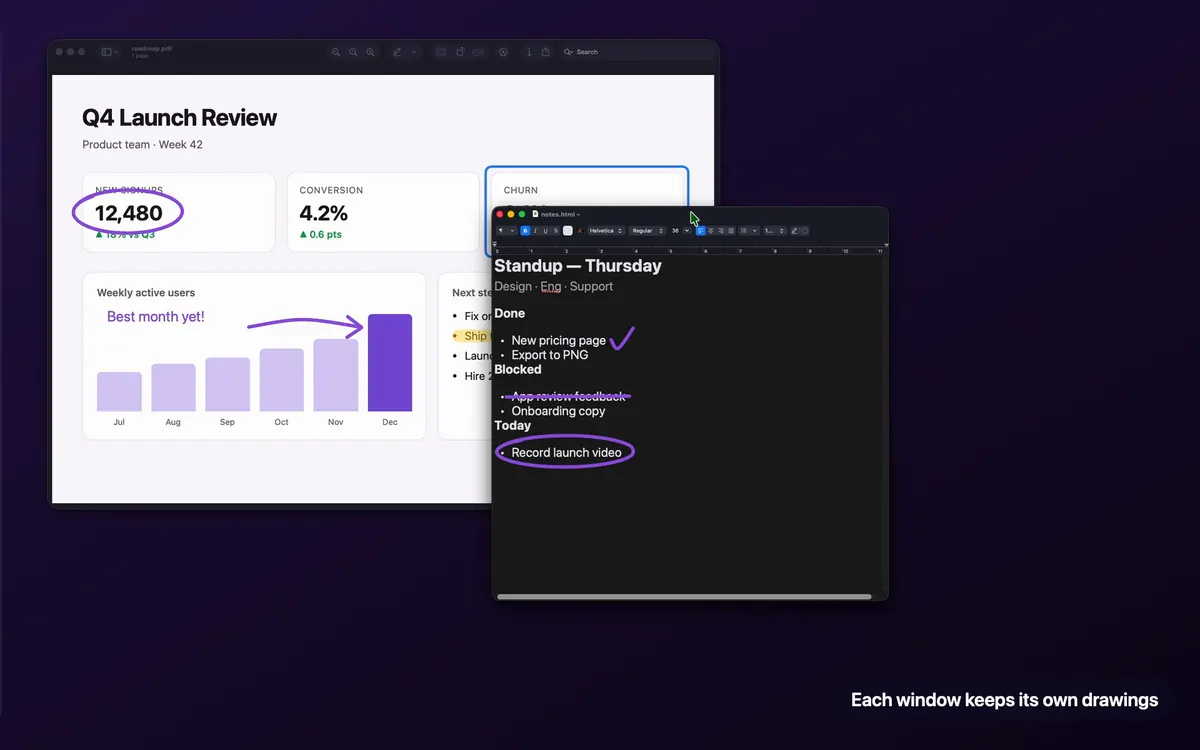
The big difference: drawings that follow windows
"Puts a layer of ink over your screen." The ink "stays put until you clear it", in the same spot on screen.
Each drawing sticks to the app window it was drawn on. Move or minimize the window and the drawing goes with it.
If you switch between apps a lot while teaching or presenting, that's the part you'll notice. Epic Pen's approach works well when nothing moves. JellyDraw is built for when things do.
Epic Pen vs JellyDraw
| Epic Pen | JellyDraw | |
|---|---|---|
| Runs on | Windows 11 and 10 | Mac, Apple Silicon, macOS 26.2+ |
| Free version | Basic, free forever, with occasional in-app promotions | Free, no time limit |
| Paid version | Pro subscription, billed yearly or monthly, 14-day trial | Pro, $9.99 once, no subscription |
| Free tools | Pen, highlighter, eraser, screenshot tool, hotkeys and ghost mode, pen pressure and multi-touch, 16 colors | Pen, highlighter, eraser, whiteboard mode, window anchoring |
| Paid tools | Text, shapes and arrows, whiteboard and blackboard, fading ink, highlighted cursor, more colors | Shapes, lines, text, export, accent colors |
| Whiteboard | Pro | Free |
| Drawings follow windows | Not described | Yes |
Epic Pen details from epic-pen.com, its pricing page and FAQ, checked October 27, 2026. Epic Pen shows Pro prices in your local currency, so we haven't listed a number. "Not described" means its site doesn't mention it.
Where Epic Pen is the better pick
- You're on Windows, or need the same tool on Windows PCs.
- You want fading ink or a highlighted cursor, which Epic Pen Pro includes.
- Your school needs volume licensing and silent deployment across many PCs, which Epic Pen offers for teams.
Where JellyDraw fits better
- You're on a Mac with Apple Silicon.
- You move between windows while you present and want each window to keep its own notes.
- You'd rather pay once ($9.99) than subscribe, or you want whiteboard mode for free.
Getting started after switching from Epic Pen
- Download from jellydraw.app and allow Accessibility access.
- Press ⌃⌥⌘Space wherever you'd have opened Epic Pen.
- Draw with the pen or highlighter, then move the window to see the drawing follow it.
The Mac app for drawing on your screen
Free with no time limit. Pro is $9.99 once, not a subscription.
Free download from jellydraw.app · Notarized by Apple · macOS 26.2 or later on Apple Silicon
Questions
Is there an Epic Pen for Mac?
No. Epic Pen's own FAQ lists Windows 11 and Windows 10 as the supported systems, and its downloads are for Windows.
What's the best Epic Pen alternative for Mac?
JellyDraw is a close match for the core tools: a free pen, highlighter, eraser and whiteboard mode on the Mac, with a one-time Pro upgrade for shapes, text and export. Its drawings also follow the window they're on.
Is JellyDraw a subscription like Epic Pen Pro?
No. JellyDraw Pro is a one-time $9.99 purchase that covers up to 5 of your Macs and all 1.x updates.